


How to block ads with Proton VPN NetShield
Blocking ads used to be a matter of comfort. A banner here, a pop up there, a noisy video advert before the thing you wanted to read or watch. Today it is also a privacy and security issue. Many adverts arrive with trackers, measurement scripts, auction systems and sometimes malicious code. For UK web users who want a calmer, faster and more private internet, ad blocking is part of basic online hygiene. 🛡️
Proton VPN NetShield is one of the most practical ways to do it. It is Proton VPN’s built in ad, tracker and malware blocker, and it works differently from a normal browser extension. Instead of waiting for your browser to load a page and then cleaning up afterwards, NetShield checks the domain requests being made by websites and apps before those resources load. If a request points to a known advert, tracker or malware domain, Proton’s DNS server blocks it.
That matters because adverts are not only found in web pages. They appear in apps, games, news feeds, streaming interfaces and smart device services. A browser extension can be excellent inside one browser, but it cannot protect every app on your laptop or phone. NetShield sits inside Proton VPN, so once you connect to the VPN and enable the right protection level, it can reduce advertising and tracking across far more of your everyday internet use.
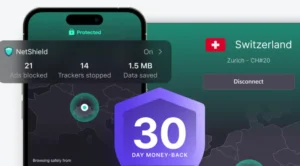
My view is simple. If you already use Proton VPN, NetShield should be one of the first settings you turn on. If you are choosing a VPN and want privacy tools that do more than change your IP address, NetShield gives Proton VPN a very useful advantage. Add to that the 30 day money back guarantee, and the equations gets very simple!
Why ads are not just annoying any more
The old advertising web was easy to understand. A website showed an advert, the reader saw it, and the publisher got paid. The modern advertising web is far more complex. A single page can call out to advertising networks, analytics platforms, data brokers, social media pixels and fraud detection systems before you have even started reading.
This is where ad blocking becomes a privacy tool. A good blocker does not simply remove ugly adverts. It also reduces the number of outside companies that can observe your browsing. That can mean fewer personalised adverts following you from site to site, fewer scripts running in the background, and fewer chances for malicious advert networks to serve harmful content.
There is also a performance benefit. If your device does not have to download advertising scripts, tracking pixels, video placements and unwanted media, pages often feel lighter. On mobile data, hotel WiFi, train WiFi or an older phone, it can be the difference between a page that crawls and a page that simply opens. 🚀
For UK users, the practical case is strong. We use the web for banking, NHS services, council admin, travel, shopping and entertainment. A cleaner browsing setup is not about hiding from the world. It is about making the everyday web less invasive and less wasteful.
What Proton VPN NetShield does
NetShield is a feature inside Proton VPN. It is designed to block three main types of unwanted internet traffic: adverts, trackers and malware domains. You control the level of blocking. You can choose to block malware only, or you can choose the stronger setting that blocks malware, adverts and trackers.
The stronger setting is the one I recommend for most people. Malware only protection is better than nothing, but it leaves the most irritating and privacy invasive parts of the modern web untouched. If your goal is to block ads, reduce tracking and make browsing feel cleaner, choose the option that includes adverts and trackers.
NetShield also includes a Privacy Panel that shows how many ads and trackers have been blocked and how much data has been saved during the current session. I like this because it makes an invisible problem visible. Without a panel, privacy tools can feel vague. With a counter, you can see that the blocker is doing real work while you browse.
There is one important point to understand. NetShield works when you are connected to Proton VPN. It is not a standalone browser extension. That is a strength if you want VPN protection and DNS based blocking in one place, but it also means you need to make Proton VPN part of your normal browsing routine.
How NetShield blocks ads before they load
Most web browsing begins with a DNS request. DNS is the address book of the internet. When a website or app wants to load a resource, your device has to find the server behind the domain name. NetShield checks those requests against known lists of domains associated with adverts, trackers and malware. If a domain is on the list, the request is blocked before the unwanted resource loads.
This approach has a clear advantage. Your browser does not have to download the advert and then hide it. Your device does not have to fetch the tracker and then hope another tool deals with it. The request is blocked at the network level, which can save time, data and processing power.
It also means NetShield can work beyond the browser. If an app makes a request to a known ad or tracker domain while Proton VPN is connected, NetShield can block it in the same way. This is one of the reasons I prefer network level blocking for ordinary users. People want one switch that covers as much as possible.
There are limits. DNS filtering works by blocking domains. It cannot always remove the empty space left behind by an advert on a page. It may not catch adverts served from the same domain as the content you want. The trade off is simple: DNS blocking is broad, efficient and easy, while browser based blocking can be more detailed inside the browser.
How to set up NetShield to block ads
Setting up NetShield is straightforward, and that is part of the appeal. You do not need to copy filter lists, install browser extensions or configure a router. For most people, the basic process is enough.
- Install Proton VPN on your device.
- Sign in with a paid Proton VPN plan that includes NetShield.
- Open the Proton VPN app.
- Go to the NetShield settings area.
- Choose the protection level that blocks malware, ads and trackers.
- Connect to a Proton VPN server.
- Browse as normal and check the NetShield Privacy Panel to see what has been blocked.
Once that is done, I would leave NetShield on for everyday browsing. Visit a few sites that you normally use, including news sites, recipe pages, shopping sites and forums. You should notice pages feeling quieter, with fewer advertising calls and fewer trackers trying to follow your visit.
If a page breaks, do not panic. Any serious ad blocker can occasionally interfere with a site that relies heavily on advertising or tracking scripts. Test the page with NetShield off, confirm whether the blocker is the cause, then decide whether that site deserves an exception in your routine.
The settings I would use
For everyday use, I would choose the setting that blocks malware, adverts and trackers. That is the whole point of NetShield. Malware only is useful for people who are worried about website compatibility, but it does not go far enough for privacy. If you are reading a guide about blocking ads, use the stronger setting.
I would also keep Proton VPN connected by default on public WiFi, mobile data and any network you do not control. Cafes, hotels, airports and trains are exactly the places where I want both VPN encryption and tracker blocking running together. You are often dealing with slow connections, unknown network operators and lots of background app traffic.
At home, the choice depends on how you use the internet. If Proton VPN is already part of your normal setup, keep NetShield on. If you have a whole home ad blocking system such as Pi hole, you may not need both at home, but NetShield is still useful when you leave the house.
What NetShield is best at
NetShield is best for people who want strong protection without tinkering. It is particularly good for users who already want a VPN, because the ad blocker is part of the same app. That reduces the number of privacy tools you have to manage.
It is also a good fit for families and less technical users. I have spent years watching otherwise sensible people install three different browser extensions, forget which one is active, and then wonder why adverts still appear in another browser. NetShield avoids that problem. Connect the VPN, enable the right blocking level, and the protection follows your device traffic more broadly.
Another strength is app coverage. Browser extensions are excellent inside browsers, but they do not help much when a mobile app is full of tracking requests. DNS based filtering has a better chance of catching those background calls. It will not remove every advert in every app, but it gives you a wider shield than a browser only tool.
Where NetShield is not the perfect answer
No ad blocker is perfect, and it is better to be honest about that. NetShield will not always make a page look as tidy as a browser extension such as uBlock Origin. DNS filtering can block the source of many adverts, but it does not always perform cosmetic cleanup. You may occasionally see blank spaces where an advert would have been.
It may also struggle with adverts served from the same domain as the content. This is common with some video platforms, social networks and streaming services. If blocking the advert would also block the content, a DNS blocker has less room to manoeuvre.
Finally, NetShield is tied to Proton VPN. If you disconnect the VPN, you lose NetShield protection. That is not a problem if Proton VPN is your main privacy tool, but it is worth knowing. Users who want ad blocking without a VPN may prefer a dedicated DNS service or a browser extension.
How NetShield compares with other ad blocking options
NetShield is not the only way to block ads. The right choice depends on where you want the blocking to happen and how much control you want.
uBlock Origin is the best choice for people who want powerful browser level blocking. It can block adverts, trackers and page elements with a degree of precision that DNS filtering cannot always match. It is especially strong for people who use Firefox or a browser that still supports the full extension properly. The downside is that it lives inside the browser. It will not protect every app on your device, and browser extension rules have become more complicated on Chrome based browsers.
Brave Shields is a strong option if you are happy to change browser. Brave blocks many ads, trackers and fingerprinting attempts by default. It is simple, fast and requires very little setup. The drawback is obvious: it protects you mainly inside Brave. If you use Safari, Chrome, Firefox, apps or smart TV services, Brave Shields are not covering that traffic.
AdGuard DNS is closer to NetShield because it also uses DNS filtering. It can block ads, trackers and malicious domains without needing a browser extension. The difference is that AdGuard DNS is a dedicated DNS service rather than a VPN feature. That can be better if you want DNS filtering without using a VPN, or if you want to configure DNS at router level. NetShield is better if you want VPN privacy and ad blocking managed in one app.
AdGuard apps go further than AdGuard DNS on some platforms because they can provide more detailed filtering. For users who want a dedicated ad blocking suite, AdGuard is a serious alternative. It is more of a specialist tool, while NetShield is more convenient for people who already want a VPN.
NextDNS is a very flexible DNS filtering service. It gives you more control over block lists, security settings, analytics and family protection. I like it for technical users who enjoy tuning their setup. For ordinary users, that flexibility can become homework. NetShield is simpler, while NextDNS is more configurable.
Pi hole is the classic whole home option. You install it on your own hardware, point your home network at it, and block unwanted domains for devices in the house. It is excellent for people who enjoy network projects and want local control. It is not the easiest route for most readers, and it does not automatically protect you when you leave home unless you add remote access or a VPN setup. NetShield is much easier for mobile and travel use.
Firefox Enhanced Tracking Protection is useful, but it is not a complete ad blocker. It blocks many known trackers and harmful scripts, which is good privacy practice, but users should not expect it to remove adverts across the web. I see it as a baseline browser privacy feature rather than a full answer.
My practical recommendation is this. Use NetShield as your main low effort blocker if you use Proton VPN. Add uBlock Origin in Firefox if you want the cleanest possible browser experience. Consider Pi hole or NextDNS only if you enjoy managing your own filtering rules. For most UK households, NetShield gives the best balance of convenience, privacy and protection.
Can you use NetShield with a browser extension
Yes, and in some cases that is the best setup. NetShield can block many advert and tracking requests at the DNS level, while a browser extension can tidy up page elements inside the browser. The two tools work at different layers.
For example, NetShield may stop a request to an advertising domain before it loads. A browser extension may then remove a blank advert container or block a script that DNS filtering cannot identify safely. This layered approach can produce a cleaner browsing experience.
Start with NetShield first. Use it for a few days. If you still see adverts in your main browser, add a trusted browser blocker. Avoid installing multiple overlapping extensions from unknown developers. Too many privacy extensions can create more risk than they solve, especially if they demand broad access to every page you visit.
Does NetShield make browsing faster
It can, and the reason is simple. If your device does not download unwanted advert and tracker resources, there is less data to load. That can make pages feel faster, reduce mobile data use and lighten the load on older devices.
The difference will vary. On a simple page with few adverts, you may barely notice it. On a heavy news site with video adverts, tracking scripts, recommendation widgets and consent tools, the improvement can be obvious. I have tested enough privacy tools over the years to know that speed claims are often exaggerated, but DNS based blocking has a straightforward technical advantage: blocked requests do not need to be downloaded.
There is another speed benefit that is harder to measure but easy to feel. The web becomes less distracting. Fewer moving adverts, fewer intrusive pop ups and fewer auto loading elements means you spend less time fighting the page. A calmer page is a faster page in practical human terms. 🙂
Who should use Proton VPN NetShield
NetShield is a particularly good fit for privacy conscious users who want one simple app to handle VPN protection and ad blocking. It suits people who use laptops and phones on public networks, people who dislike browser extension clutter, and people who want protection that extends beyond a single browser.
It is also a good choice for UK users who are already considering Proton VPN for security, streaming privacy, travel or general online protection. The VPN market is crowded, and many providers now add extra privacy tools. NetShield feels like one of the more useful additions because it solves a real everyday problem.
Power users may still prefer a layered setup. I would use NetShield with a strong browser blocker on my main desktop browser, then rely on NetShield alone on devices where simplicity matters. For non technical users, I would keep it simpler. Install Proton VPN, enable NetShield’s ads and trackers setting, connect, and get on with your life.
Final verdict
Proton VPN NetShield is one of the easiest ways to block ads, trackers and known malicious domains while also using a VPN. It is not the most granular blocker on the market, and it will not replace every specialist tool for every enthusiast. But for most people, that is not the point.
The point is that NetShield works before unwanted resources load, it protects more than just one browser, it gives clear control over blocking levels, and it shows what it has blocked through the Privacy Panel. That combination makes it a strong recommendation for UK users who want a cleaner, safer and more private web.
If you already have Proton VPN, turn NetShield on today. If you are choosing a VPN and ad blocking is on your wish list, Proton VPN deserves to be near the top of your shortlist. The best privacy tool is the one you actually keep using, and NetShield is easy enough to become part of your normal routine. ✅
Frequently Asked Questions
What is Proton VPN NetShield?
NetShield is Proton VPN’s built in ad, tracker and malware blocker. It uses DNS filtering to block known unwanted domains before those resources load on your device.
Does NetShield block ads in apps?
NetShield can block some app adverts and trackers because it works at the DNS level rather than only inside a browser. It will not block every app advert, especially when adverts are served from the same domain as the app content.
Do I need a browser extension if I use NetShield?
Not always. NetShield is enough for many users. A browser extension such as uBlock Origin can still help if you want more detailed page cleanup inside your browser.
Is NetShield better than uBlock Origin?
NetShield is better for broad device level blocking through a VPN. uBlock Origin is better for detailed browser level blocking. The best choice depends on whether you want simple wide coverage or maximum browser control.
Does NetShield work without Proton VPN?
No. NetShield is a Proton VPN feature, so you need to be connected through Proton VPN for NetShield protection to apply.
Which NetShield setting should I use?
Most users who want to block ads should choose the setting that blocks malware, ads and trackers. Malware only protection is useful, but it does not remove the main advertising and tracking problem.
Can NetShield make browsing faster?
Yes, it can. By blocking unwanted ad and tracker resources before they load, NetShield can reduce the amount of data your device downloads and make heavy pages feel faster.
Is NetShield suitable for UK users?
Yes. NetShield is a practical choice for UK users who want stronger privacy, cleaner browsing and protection that works beyond a single browser while using Proton VPN.
