

When people talk about VPN services they usually think about laptops and phones, but gaming consoles are quietly becoming one of the most important devices on the home network 🎮. Modern Xbox and PlayStation consoles are always online, constantly chatting with game servers, friends lists, store fronts and streaming apps. That always connected behaviour is convenient, but it also raises privacy questions and can cause real frustration when games or streaming content are blocked in your region.
Over the past few years I have spent a lot of time experimenting with VPN services and gaming setups in a typical UK home. I have tested with Xbox, PlayStation and Nintendo Switch, using both fast fibre lines and more modest connections. My conclusion is simple. A good VPN can make online gaming safer and more flexible, but only if you set it up in the right place and keep your expectations realistic. You cannot install a VPN app directly on most consoles, so the trick is to use your router, a spare computer or Smart DNS to do the heavy lifting in the background.
Why use a VPN on Xbox, PlayStation and other consoles
There are four main reasons gamers ask me about VPNs for consoles. Each one is valid, although some are easier to achieve than others:
- Extra privacy and security: A VPN encrypts your traffic between home and the VPN server. That makes it harder for internet providers or local networks to see what games you are playing or which services you use. It also helps to shield your real address from other players in peer to peer matches, which reduces the risk of harassment through your connection.
- Access to different game regions: Some game content, betas or in game events are released first in certain countries. A VPN can sometimes let you appear to be in another region to claim them, although you often need a matching account region as well.
- More consistent routes to game servers: Occasionally a VPN can improve stability by routing around congested paths used by your provider. This is not guaranteed, but I have seen it help with certain games at busy times.
- Streaming apps on consoles: Xbox and PlayStation are excellent devices for Netflix, Disney Plus and similar platforms. A VPN or Smart DNS can help you keep streaming activity more private or reach services while travelling.
The key point is that a VPN is not a magic speed booster. It is a privacy tool that sometimes brings side benefits for routing and access. If you start from that mindset you will be much happier with the results 😊
Why consoles do not have native VPN apps
When people first look for a VPN for consoles they are often surprised to find there is no app store listing. On phones and computers you simply search for the provider, install and log in. Xbox, PlayStation and Nintendo work differently.
Console makers prefer a tightly controlled environment. They decide which apps are allowed and how they can interact with the network. At the time of writing mainstream VPN providers do not have full native apps for these systems. When you see a VPN mentioned in a console store listing it is usually a Smart DNS helper or a browser add on rather than a full VPN client.
That limitation is annoying, but it does not mean you cannot use a VPN with a console. It just means that you have to put the VPN somewhere else in your network path, either on your router or on another device that shares its connection.
What if I want speed on my Xbox or PlayStation and security on other devices?
This is where split tunnelling comes in. You can create a tunnel past the VPN just for your console, that allows it to use the full bandwidth of your internet connection, whilst still keeping all your other devices securely behind your VPN. This does mean that your console traffic is not protected by the VPN, but you also don’t add any latency to the connection. Provided you are not banking or shopping (or really doing anything but gaming) on your console, this is a viable option!
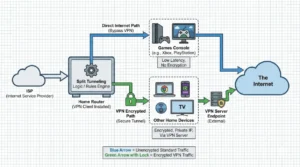
Keep your whole network safely behind your VPN, but let your console maximise available bandwidth/latency.
Option 1 Use a VPN on your home router
Running your VPN on the router is my preferred approach for serious console use. Once it is set up, every device that connects to that router can benefit from the VPN without needing its own app. Your console sees a normal network, while the router quietly encrypts traffic in the background 🔐
In practice this works in two ways:
- Router with built in VPN support: Some consumer routers, especially from Asus, TP Link and similar brands, include VPN client options in their settings. You enter your VPN account details, choose a server and the router handles the rest. This is the cleanest method if your existing hardware supports it.
- Flashed firmware: Enthusiasts sometimes install custom firmware such as OpenWrt or DD Wrt on supported routers, which adds VPN features. This gives you more control but it is more complex and there is a small risk of damaging the router if you get it wrong. I only recommend this to confident users who are happy to follow detailed guides.
The benefits of a router level VPN for consoles include:
- Your Xbox, PlayStation or Switch does not need any configuration changes
- Every device in the house can share the same VPN protection
- You can combine the VPN with parental controls or firewall rules on the router
The main drawback is that all traffic goes through the same tunnel. If family members complain that video calls or work systems do not like the VPN, you may need to split your network or use features like split tunneling on more advanced routers.
Option 2 Share a VPN connection from a computer
If your router does not support VPN clients, or you prefer not to change its settings, the next best option is to turn a computer into a simple VPN gateway. I have used this method many times during testing, especially in rented accommodation where I could not replace the router.
The idea is straightforward. You install the VPN app on a Windows or macOS laptop, connect it to the service, and then share that connection with your console through Ethernet or a Wi Fi hotspot.
At a high level the steps look like this:
- Install your chosen VPN app on the computer and sign in.
- Connect to a VPN server that makes sense for your gaming, usually the nearest one.
- Enable connection sharing in the operating system settings. On Windows this is called mobile hotspot or Internet Connection Sharing. On macOS you find it under Internet Sharing.
- Connect your console to the new shared network, either with a cable from console to laptop or through the Wi Fi hotspot name you set.
Once this is done, all traffic from the console flows through the computer and into the VPN tunnel. The advantage is flexibility. You can quickly switch servers or providers and you do not have to touch the main router. The disadvantage is that the computer has to be on whenever you want to play and it adds a small amount of extra delay to the network path.
Option 3 Use Smart DNS for region control
Many premium VPN services now offer Smart DNS as part of their bundle. Smart DNS is not a full VPN. It does not encrypt all of your traffic. Instead it selectively redirects the DNS lookups that streaming apps use to decide what country you are in. This can be very handy on consoles that focus on streaming as well as gaming.
In real use Smart DNS works like this:
- You sign in to your VPN account on the provider website and enable Smart DNS.
- The site gives you one or two special DNS addresses.
- You go to network settings on your Xbox or PlayStation and enter those DNS values manually.
- When you launch certain streaming apps, their region checks go through the Smart DNS system and see a different country.
The benefits are obvious. There is almost no speed loss, so streaming stays smooth and responsive. Setup is simpler than router level VPN, and the console can still use local servers for game traffic while using other regions for streaming libraries.
The trade off is privacy. Since Smart DNS does not encrypt everything, it is not a direct replacement for a VPN from a security perspective. I treat it as a specialist tool for streaming access rather than an all round shield.
Best VPN features for console gamers
Once you have chosen your setup method, the next step is picking a VPN service with the right features. In my testing some options that look impressive on paper do not translate well to gaming, while others quietly excel.
Here are the features I value most for console use:
- Fast and consistent nearby servers: For gaming you want the lowest possible delay. That usually means connecting to a server in your own country or a neighbouring one. Providers that overload their servers will cause lag spikes, which are very noticeable in fast games.
- Strong privacy policy: Even if your main goal is gaming, the provider should still have a clear policy that avoids logging your activity in a way that can be tied back to you.
- Router and Smart DNS support: Since you cannot install an app on the console itself, good documentation for routers and Smart DNS is essential.
- Reliable connection under load: Some VPN clients struggle when several devices and large downloads are active. The best ones keep going without drama.
- Responsive customer support: When you run into a tricky router setup, the ability to get practical answers from support staff becomes very valuable.
Speed tests on a single computer are not enough to judge console suitability. I look for providers that perform well over evenings and weekends on a variety of servers and that provide clear setup guides for non expert users.
What a VPN can and cannot fix in online games
It is important to draw a clear line between problems a VPN might improve and problems that are entirely outside its control. Marketing copy sometimes blurs this line to make VPNs sound like performance boosters. Real testing tells a more nuanced story.
Issues a VPN may help with:
- If your internet provider sends your traffic on a very indirect route to certain game servers, a VPN might offer a more direct path.
- If your provider shapes or slows certain types of traffic, a VPN can sometimes hide that and keep speeds more stable.
- If your public address has been targeted for nuisance traffic from other players, a VPN can give you a fresh address and make it harder for them to continue.
Issues a VPN cannot solve:
- A slow basic internet connection. If your line is limited to ten megabits, a VPN cannot magically turn it into fibre.
- Overcrowded Wi Fi in your own home or building. If the radio signal is a mess, no amount of encryption will fix it. A cable from console to router often works wonders.
- Server problems on the game side. If the game platform is having a bad evening, everyone will suffer, VPN or not.
The most honest way to describe it is that a VPN gives you another route and another layer of privacy. In some cases that route is better, in some cases it is the same, and in a few cases it is worse. Testing a few servers at the times you usually play is the only reliable way to know.
Example setup for an Xbox console
To make all this more concrete, let me walk through a simple example based on an Xbox Series console in a UK home. The goal is to use a VPN for privacy and occasional region switching, without making life difficult for the rest of the household.
In this scenario I would:
- Choose a VPN provider that offers both router support and Smart DNS.
- Check whether the existing router supports a VPN client in its settings. If yes, I would set up a UK based server on that router and test speeds during the evening.
- Enable Smart DNS in the VPN account panel and register my home address, as many services require this step.
- On the Xbox go to network settings and first test everything through the router VPN alone, to see how multiplayer feels in my favourite games.
- If I needed to access a different streaming region, I would then set the console DNS servers to the Smart DNS addresses, keeping the game traffic mostly local while using the VPN provider logic for streaming apps.
In my own experiments this type of setup strikes a good balance. Daily gaming remains smooth, basic privacy is in place for all devices, and I only tweak settings when there is a specific streaming need.
Privacy and safety tips for console VPN use
Consoles do not store as much personal work data as a laptop, but they still reveal a lot about your habits and family life. Here are a few simple precautions that I find worthwhile when using VPNs with them:
- Secure your accounts: Use strong passwords and enable two factor authentication on PlayStation Network, Xbox accounts and Nintendo accounts. A VPN does not protect you if someone simply logs in with stolen details.
- Review privacy settings in the console system: Both Xbox and PlayStation offer controls over who can see your online status, messages and voice chat. Combine these with a VPN for the best overall protection.
- Be cautious with voice chat and friend requests: Even if your address is shielded, social engineering remains a common problem. Only accept invites from people you actually know or have played with for a while.
- Avoid free VPNs on routers: For console setups I strongly favour reputable paid services. Free VPNs often have unclear funding models, weak support and limited documentation for advanced setups.
Used with these precautions, a VPN becomes one part of a wider approach to safe gaming, especially for younger players.
Frequently Asked Questions
Can I install a VPN app directly on my Xbox or PlayStation
No, mainstream VPN apps are not available as native clients on Xbox, PlayStation or Nintendo consoles. Instead you run the VPN on your router or on a computer that shares its connection, or you use Smart DNS for certain streaming tasks.
Will a VPN lower my ping in online games
Sometimes a VPN can lower your ping if it gives you a more direct or less congested route to the game server. However it can also increase your ping because of the extra distance to the VPN server and the encryption process. It is best to treat lower ping as a possible bonus, not a guarantee, and to test several servers at the times you normally play.
Is it safe to use a VPN for console gaming
Yes, it is safe as long as you choose a reputable provider and follow their setup instructions. The VPN encrypts your traffic between your home and the VPN server, which can make you less exposed to certain attacks that rely on knowing your address. You should still use strong account security and sensible privacy settings on the console itself.
Can I use a free VPN with my gaming console
Technically you can, by installing the free VPN on a router or a computer that you share with the console. In practice I do not recommend this for long term use. Free VPNs usually have strict data limits, crowded servers and weaker documentation, all of which can hurt gaming performance. For a device that is online as often as a console, a reasonably priced paid VPN is usually a better choice.
Will a VPN let me play games that are not released in my country
In some cases a VPN can help you access game content that is restricted to another region, especially betas or early trials. However store purchases and full game access are often tied to the region of your account and payment method, not just your address. You may need a separate account in the target region, and you should always respect the terms of service of the platform you use.
Can a VPN stop people from finding my address through games
A VPN can make it much harder for other players to see or abuse your real address, particularly in peer to peer lobbies where that information might otherwise be exposed. By placing the VPN server between you and the match, you limit what others can see. This is one of the most practical security benefits of a console VPN setup.
Is Smart DNS the same as a VPN on a console
No, Smart DNS only redirects certain traffic, usually for streaming services that check your region. It does not encrypt all your data. This means Smart DNS is useful for accessing streaming libraries but does not offer the same privacy protections as a full VPN tunnel. Many gamers use both, with VPN on the router and Smart DNS tuned for specific apps.
Do I need a special router to use a VPN with my console
You do not always need a special router, but you do need one that supports VPN client connections if you want the VPN at router level. Some models from mainstream brands already include this feature. If your current router does not, you can either replace it with one that does or use a spare computer to share a VPN connection with the console.
